ESP32 Buzzer with Arduino IDE
## Introduction An active buzzer module is a simple sound-producing component that’s easy to integrate with the ESP32. Unlike a passive buzzer, it generates sound when voltage is applied, making it ideal for alerts and alarms. This module typically has 3 pins (VCC, GND, and Signal), allowing for dir
#Introduction
An active buzzer module is a simple sound-producing component that’s easy to integrate with the ESP32.
Unlike a passive buzzer, it generates sound when voltage is applied, making it ideal for alerts and alarms.
This module typically has 3 pins (VCC, GND, and Signal), allowing for direct control through digital pins on the ESP32.
In this tutorial, we’ll explore how to use the ESP32 to play tones on the buzzer using the ledcWriteTone() function (ESP32 alternative to tone()).
#Required Components
- ESP32 Board
- Buzzer module
- Jumper wires
- Breadboard (optional)
#Pinout

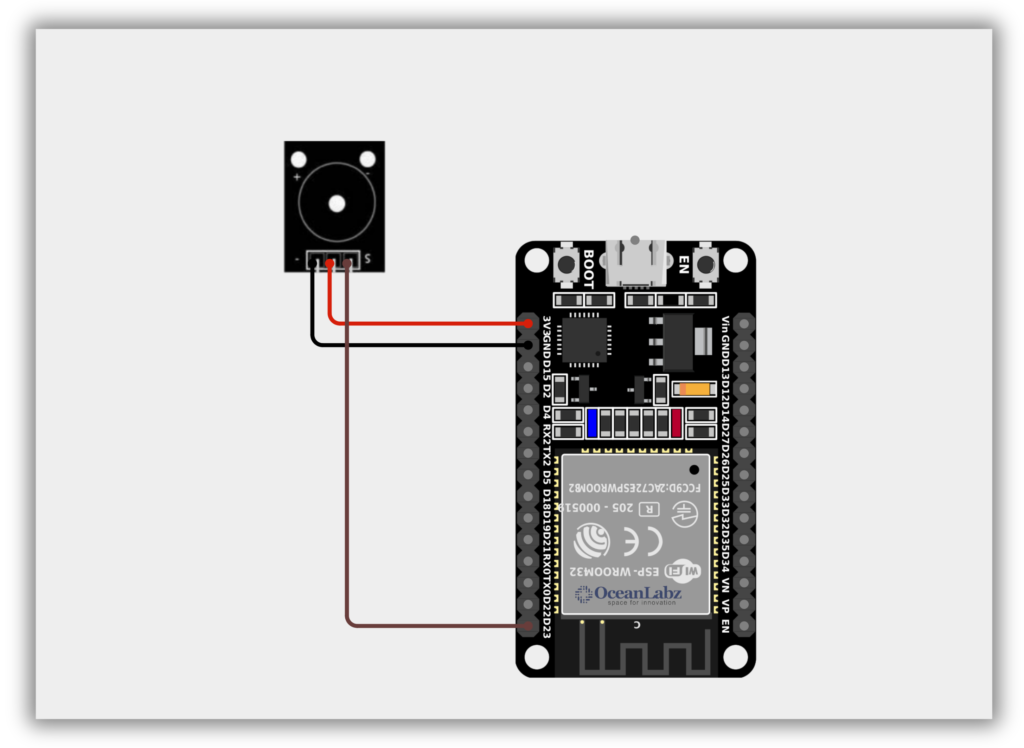
#Circuit Diagram / Wiring
- BUZZER VCC → 3.3, 5V (ESP32)
- BUZZER GND → GND (ESP32)
- BUZZER SIGNAL → Pin 23 (ESP32)
#Code / Programming
/* Filename: pwm_buzzer_tone.ino Description: Play different tones using a buzzer connected to an ESP32 via PWM Author: www.oceanlabz.in Modification Date: 1/4/2025 */
int buzzerPin = 23; // Use any PWM-capable GPIO pin (e.g., GPIO23)
// Assign a PWM channel for the buzzer const int buzzerChannel = 0;
void setup() { // Configure the buzzer pin for PWM output ledcSetup(buzzerChannel, 1000, 8); // 1000 Hz, 8-bit resolution ledcAttachPin(buzzerPin, buzzerChannel); }
void loop() { // Play 1000 Hz tone ledcWriteTone(buzzerChannel, 1000); delay(500);
// Silence the buzzer for 0.5 seconds ledcWriteTone(buzzerChannel, 0); delay(1000);
// Play 1500 Hz tone ledcWriteTone(buzzerChannel, 1500); delay(500);
// Silence the buzzer ledcWriteTone(buzzerChannel, 0); delay(1000); }
#Explanation
- An active buzzer generates sound when voltage is applied—no need to generate tones manually.
- On the ESP32,
ledcWriteTone()is used to create tones, replacing the unsupportedtone()function. - By changing the frequency, the ESP32 can play different beeps or alerts via PWM on any digital pin.
#Troubleshooting
- If no sound is heard, make sure the buzzer is active type and connected to a PWM-capable GPIO (e.g., GPIO23).
- Check if
ledcAttachPin()andledcSetup()are properly configured before callingledcWriteTone(). - If the buzzer is weak or silent, try powering it from 5V (if supported) and double-check the wiring.