ESP32 WS2812 RGB LED with Arduino IDE
## **Introduction** The WS2812 breakout board features individually addressable RGB LEDs, ideal for stunning lighting effects and animations. With just a single data pin connected to the ESP32, you can control the color and brightness of each LED independently. Perfect for projects like decorative l
#Introduction
The WS2812 breakout board features individually addressable RGB LEDs, ideal for stunning lighting effects and animations.
With just a single data pin connected to the ESP32, you can control the color and brightness of each LED independently.
Perfect for projects like decorative lighting, visual indicators, and interactive displays using the ESP32.
#Required Components
- ESP32 Board
- WS2812 breakout board
- Jumper wires
- Breadboard (optional)
- Power supply (if using multiple LEDs)
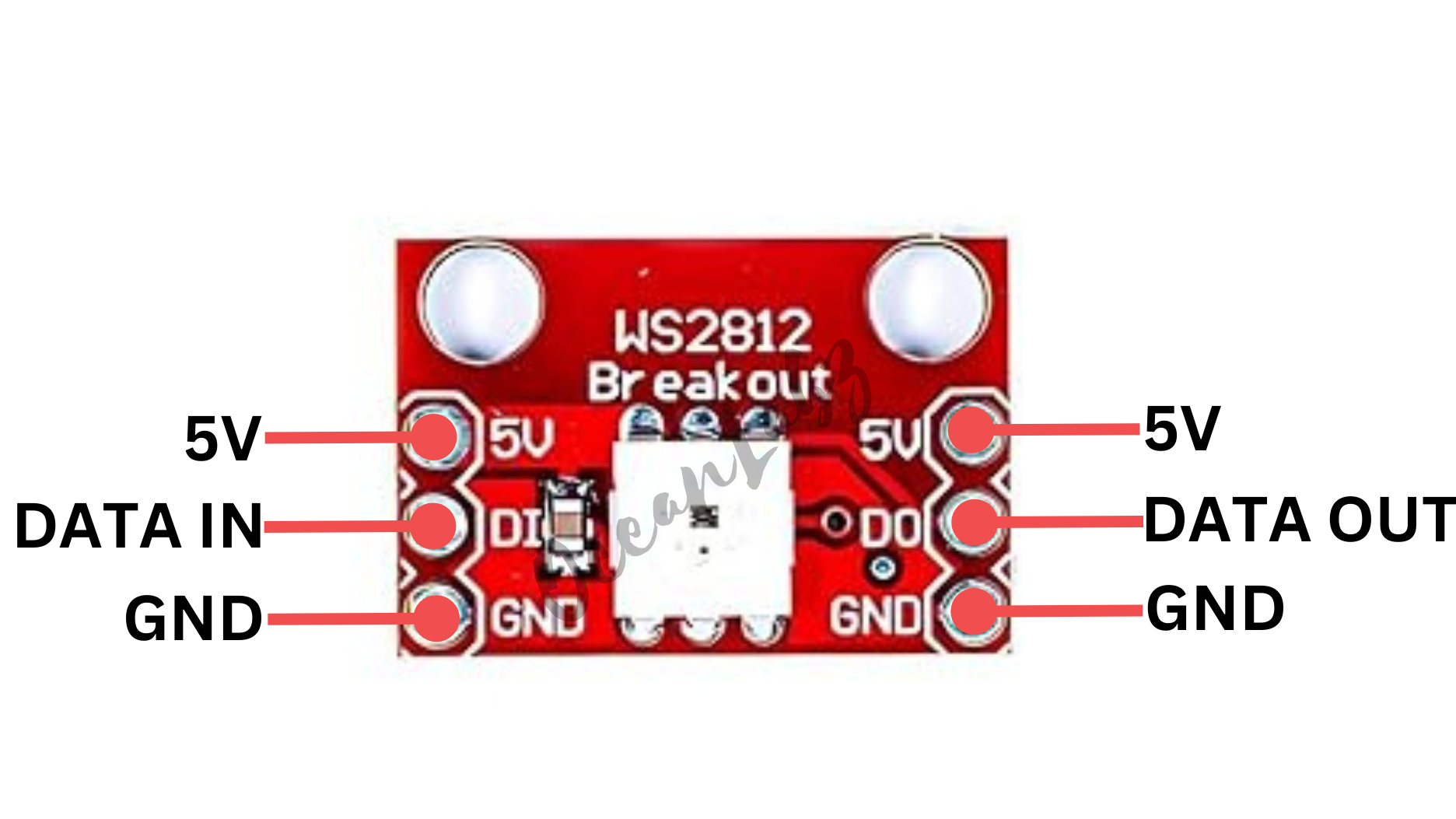
#Pinout
#Circuit Diagram / Wiring
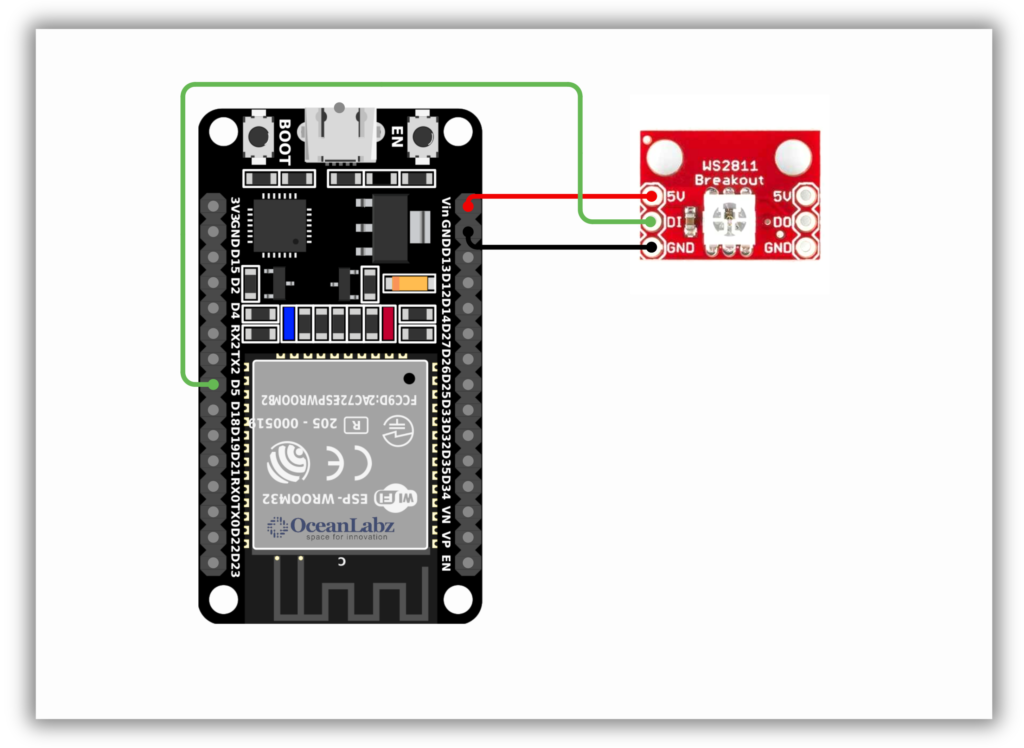
- WS2812 5V → VIN/5V (ESP32)
- WS2812 GND → GND (ESP32)
- WS2812 DI (Data IN) → Pin 5 (ESP32)
#Code / Programming
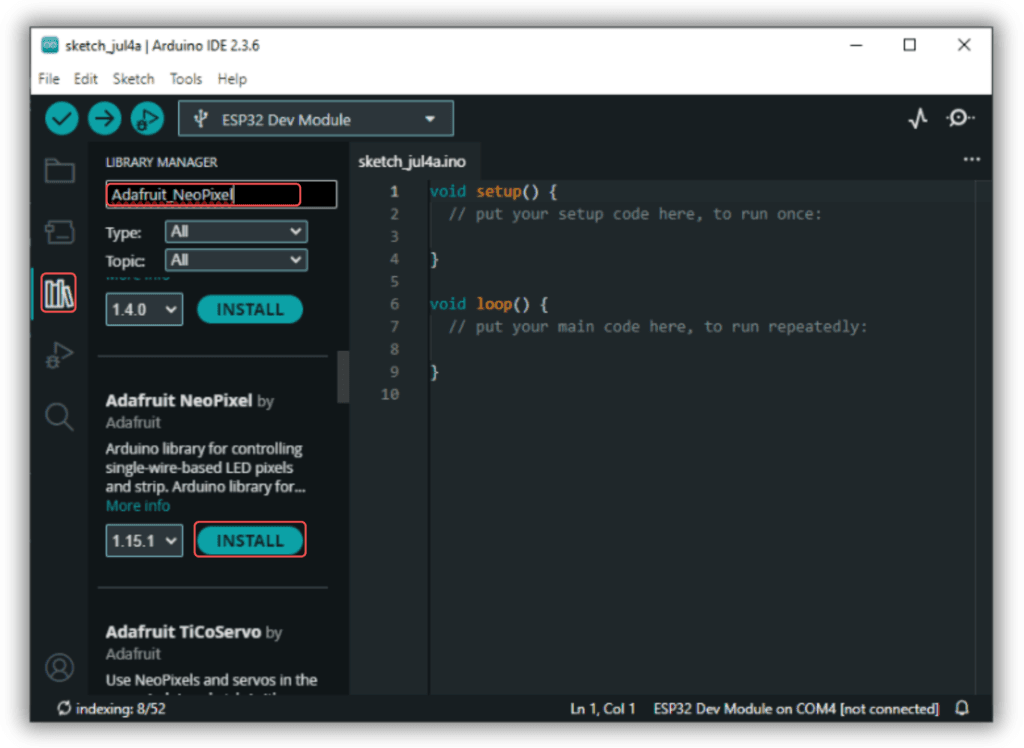
- Install Required Library (via Arduino Library Manager).
- Go to the “Libraries” tab on the left-hand side of the screen.
- Click on the “Library Manager” button (book icon) at the top of the Libraries tab.
- In the Library Manager window, type “Adafruit_NeoPixel” in the search bar.
- Locate the “Adafruit_NeoPixel” library click on the “Install” button next to it.
- Wait for the library to be installed, and you’re ready to use the Adafruit_NeoPixel library in your projects.
/* Filename: esp32_ws2812_effects.ino Description: Demonstrates rainbow, color wipe, solid color, and breathing effects using WS2812 LED with ESP32. Author: www.oceanlabz.in Modification: 1/4/2025 */
#include <Adafruit_NeoPixel.h>
#define PIN 5 // Use a safe digital GPIO pin on ESP32 #define NUM_LEDS 1 // Number of WS2812 LEDs #define DELAY_TIME 10 // Delay for Rainbow effect #define BREATH_SPEED 10 // Speed for breathing effect
Adafruit_NeoPixel strip(NUM_LEDS, PIN, NEO_GRB + NEO_KHZ800);
// Array of colors for cycling uint32_t colors[] = { strip.Color(255, 0, 0), // Red strip.Color(0, 255, 0), // Green strip.Color(0, 0, 255), // Blue strip.Color(255, 255, 0), // Yellow strip.Color(0, 255, 255), // Cyan strip.Color(255, 0, 255) // Magenta };
void setup() { strip.begin(); strip.show(); // Initialize all pixels to 'off' }
void loop() { // Rainbow effect rainbowCycle();
// Color wipe through defined colors for (int i = 0; i < 6; i++) { colorWipe(colors[i], 50); delay(1000); }
// Display colors directly one by one for (int i = 0; i < 6; i++) { strip.setPixelColor(0, colors[i]); strip.show(); delay(1000); }
// Breathing effect in different colors breathingEffect(strip.Color(255, 0, 0), BREATH_SPEED); // Red breathingEffect(strip.Color(0, 255, 0), BREATH_SPEED); // Green breathingEffect(strip.Color(0, 0, 255), BREATH_SPEED); // Blue breathingEffect(strip.Color(255, 255, 0), BREATH_SPEED); // Yellow }
// Rainbow cycle function void rainbowCycle() { for (int hue = 0; hue < 256; hue++) { strip.setPixelColor(0, strip.ColorHSV(hue * 65536L / 256)); strip.show(); delay(DELAY_TIME); } }
// Wipe a color across the LED void colorWipe(uint32_t color, int wait) { for (int i = 0; i < NUM_LEDS; i++) { strip.setPixelColor(i, color); strip.show(); delay(wait); } }
// Smooth breathing effect void breathingEffect(uint32_t color, int breathSpeed) { for (int brightness = 0; brightness <= 255; brightness++) { strip.setPixelColor(0, color); strip.setBrightness(brightness); strip.show(); delay(breathSpeed); } for (int brightness = 255; brightness >= 0; brightness--) { strip.setPixelColor(0, color); strip.setBrightness(brightness); strip.show(); delay(breathSpeed); } }
#Explanation
- WS2812 LEDs are individually addressable RGB LEDs controlled using a single digital pin on the ESP32.
- Each LED’s color and brightness can be set independently using the Adafruit NeoPixel library.
- Ideal for color effects, animations, and visual feedback in interactive ESP32 projects.
#Troubleshooting
- If LEDs don’t light up, verify the data pin connection and ensure
strip.begin()is called insetup(). - Use a proper 5V power supply for the WS2812; ESP32’s 3.3V pin is not sufficient for LED power.
- If colors flicker or don’t respond, use a logic level shifter or a 330Ω resistor on the data line for signal reliability.
#Project 1: WS2812 WiFi Control Color Picker
#Introduction
This project uses an ESP32 as a WiFi web server to control a WS2812 RGB LED remotely.
Users can access a simple web interface to change the LED's color and adjust its brightness in real time.
The interface includes an HTML color picker and a brightness slider for intuitive control.
It demonstrates the powerful combination of ESP32, WiFi, and NeoPixel for interactive IoT lighting.
Perfect for smart home lighting, decorative effects, or beginner-friendly IoT experiments.
#Required Components
- ESP32 Board
- WS2812 breakout board
- Jumper wires
- Breadboard (optional)
- Power supply (if using multiple LEDs)
- Wi-Fi Network (2.4 GHz)
#Code / Programming
/********************************************************************** * Filename : ws2812_wifi_control * Description : ESP32-based WiFi Web Server for controlling a WS2812 RGB LED * Supports real-time color selection and brightness control * via a simple web interface * Author : www.oceanlabz.in * Modification: 1/4/2025 **********************************************************************/
#include <WiFi.h> #include <Adafruit_NeoPixel.h> #include <WebServer.h>
#define LED_PIN 5 #define NUM_LEDS 1
const char* ssid = "YOUR_SSID"; const char* password = "YOUR_PASSWORD";
Adafruit_NeoPixel led(NUM_LEDS, LED_PIN, NEO_GRB + NEO_KHZ800); WebServer server(80);
uint8_t brightness = 255; // Full brightness by default uint32_t currentColor = 0x00FF00; // Green by default
void updateLED() { uint8_t r = (currentColor >> 16) & 0xFF; uint8_t g = (currentColor >> 8) & 0xFF; uint8_t b = currentColor & 0xFF;
r = map(r * brightness, 0, 255 * 255, 0, 255); g = map(g * brightness, 0, 255 * 255, 0, 255); b = map(b * brightness, 0, 255 * 255, 0, 255);
led.setPixelColor(0, led.Color(r, g, b)); led.show(); }
void handleRoot() { String html = R"rawliteral(